Are you recording already, Mrs. Schütt?
yes :)
really?
yes :)
I'm super nervous
I don't know what to say :)
first video Mr. Paulussen! :)
yeah, my first video!
welcome to my YouTube channel!
which had 15 views until today ;)
how many subscribers?
I don't have subscribers!
it doesn't even show the button in my case
there's just not enough potential ;)
no, I have no clue to be honest
up until now I only used my channel
to record bug videos
and send them to developers
now I decided
I want to start sharing
what I'm doing when making music
how I'm doing it
what equipment I own
why I made certain decisions
why I use some tools and avoid others
excuse me, bug videos?
you mean Bitwig, right?
that's the app that you are using
why do you say "bug" and "Bitwig" in one sentence?
that doesn't fit!
no, I do a lot of debugging
I'm always interested in trying out new stuff
and I also work with software development as my job
and that's why I am often occupied
fiddling with new stuff
and debugging it
on that behalf I record some videos
ok
that's what I've used my YouTube channel for :)
good, why not!?
ok, so let me show you my little home studio then
when I started my company 20 years ago
I heard of Klein + Hummel
I have the exact same system in the kubus media studio
which is the Klein + Hummel O 110
plus, under the table there's a O 800 sub module
not currently visible
I can enable or disable the sub via a foot pedal
this is the foot pedal switch
to easily enable or disable the sub
when testing low frequencies
over there is my Hackintosh
it's a super basic setup actaully
I have an SPL Crimson
it combines monitor controller and interface
I have a decent headphone
I have two microphone stands
and two Aston Origin microphones
to record the Gubal
or sound effects etc.
this is a composition I am working on
I'm working on my second album
I have a completely software based setup
I used to own a bunch of synthesisers
and quite a lot of outboard gear
but had to go through a financially challenging situation
had to sell everything
did not make music for a long time
now I am back at making music regularly
so now everything's in the box
meaning I do everything with the computer
Bitwig Studio plays a large role in my decision
to make everything with the computer
hahaha, Bitwig left you… :)
no, it did not leave me, that's the screen saver :)
fine
so, let me show you a little bit of Bitwig
ok
I regained an immense amount of joy in the process of making music thanks to Bitwig Studio
made my entire first album with it
working on my second album right now
use every free minute I have to make music
and would like to quickly show you why I love Bitwig
the first thing that really stands out is Bitwig's dual monitor behaviour
I wasn't able to test this myself yet
but from what I've heard, working with three monitors is even greater
with two monitors, using tab to switch between views
I can always have the Mixer on one screen
I can configure one view to show all effect sends
while being able to have a selected item in detail on the other screen
so I can focus on the details of what I am working on
just a little side speech on why two displays are great
I like Bitwig so much because
a while ago I tried Ableton Live
but I did not became friends with the user interface
I did not like it too much to be honest
in my opinion it is hard to determine where an element starts (or ends)
when I first saw Bitwig my thoughts where
it's similar to Ableton Live, but looks more like Logic
and Logic is where I come from
this is why (at least from a visual standpoint) it was easy for me to dive into Bitwig right from the start
from Ableton Live I knew the Clips concept
Bitwig has also a vertical clip view
you have horizontal and vertical clip views
which is super helpful when I'm arranging
also super awesome is the concept of the Modulators
they allow to influence anything from anywhere
so I could add a Tool device to this track
then add an Audio Sidechain Modulator to that device
and then set the Audio Sidechain to receive a signal from the kick track
just to demonstrate this
the following example is probably a bit brutal and not something I would do
but I could use the audio signal of the kick track
via the Audio Sidechain Modulator to regulate the volume of a group
you can already see this in action here
so in this example the Modulator is acting like sidechain compression and lowers the volume via the signal of another track
but there's far more to the Modulators in Bitwig
I could for example
add an infinite amount of modulators to any device
and they can be added to internal devices as well as to any VST device
they can be routed super flexibly, combined, processed with mathematical operations
it's pure joy! :)
a bit like a science tool kit for music making
another thing I really liked instantly about Bitwig was
that I could work very spontaneously
very intuitively
and achieve compelling results very fast
without any sort of inconvenient complexity or illogical overhead
whereas illogical reminds me of my work with Logic in many cases ;)
so no more fighting with annoyances for hours
here everything is super efficient
super simple to understand
plus I like the UI a lot
the workflow is super fast
I can operate everything from my keyboard with shortcuts
with the Browser I can add items from anywhere
Bitwig's browser is awesome anyways
everything can be searched by keyboard input
I can add a new track like that
any element
and everything without the need to take my hands off the keyboard
open and close plugin windows etc. – I just love it! :)
so now I just need to say thank you and that's it
thanks for watching!
I'd like to make more videos
about Bitwig
Bitwig 2.0 specifically
about everything workflow related
about the Hackintosh
about music production in general
and I'm looking forward to it!
see you soon!
was that good?

 For more infomation >> Wow Central Park Escape walkthrough.. - Duration: 7:03.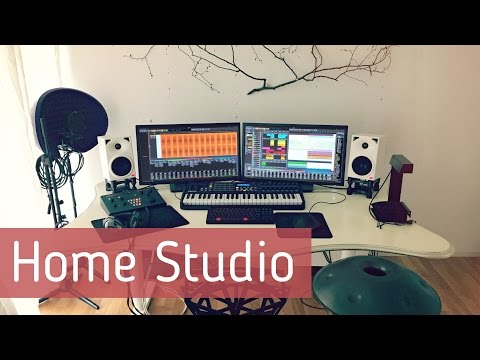

Không có nhận xét nào:
Đăng nhận xét